
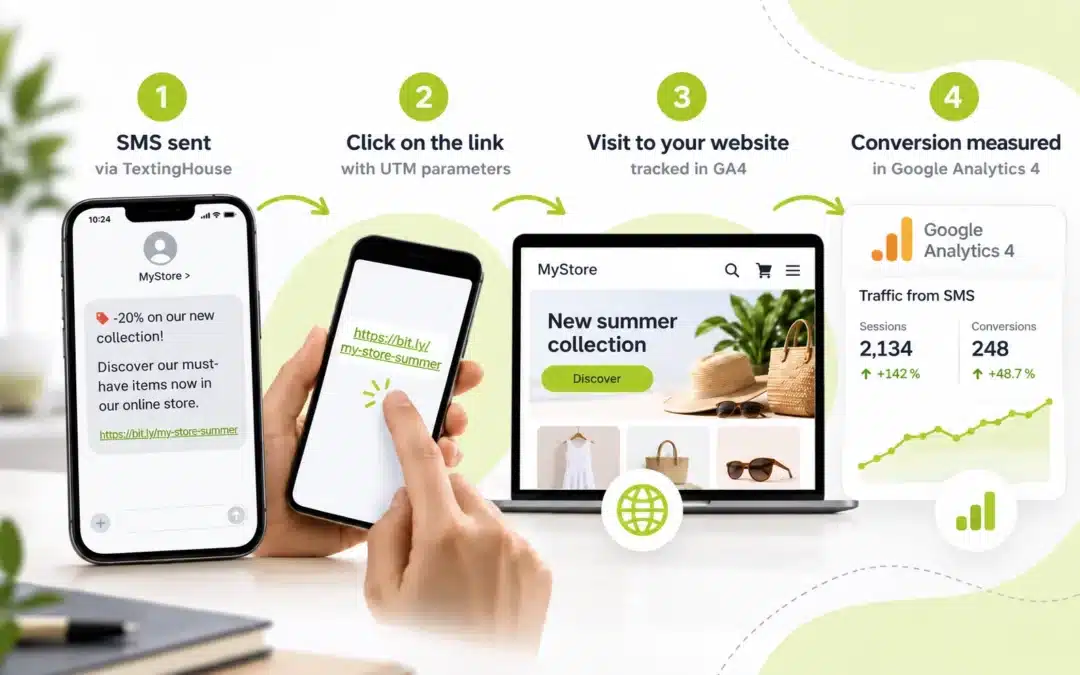
Your SMS campaign went out on Tuesday at 10 am, delivery reports confirm your messages arrived, and your website sees a spike in visits within the hour. Yet in Google Analytics 4, those visitors blend into the crowd, lumped in with people who typed your address. Without UTM parameters, GA4 (Google Analytics 4) has no way of knowing that a visit came from your SMS. This guide shows you how to track SMS campaigns in Google Analytics 4: create trackable links, keep them short and read your results, with no technical skills required.
Why SMS traffic gets lost in GA4
When a recipient taps the link in your SMS, their messaging app opens the page without saying where the visit came from.
Google confirms it: without UTM parameters, traffic source information is lost. The visit is then classed as “Direct”, the channel for people who type your address or use a bookmark.
The result: you can’t separate the impact of your campaign from the rest of your traffic, let alone tell whether it generated sales.
Yet your tools complement each other. Your SMS platform tells you whether each message was sent, delivered or not delivered through campaign tracking. GA4 takes over after the tap: pages viewed, forms submitted, purchases. UTM parameters connect the two.
What are UTM parameters?
A UTM parameter (short for Urchin Tracking Module, after the tool that became Google Analytics) is a tag added to the end of a web address. It doesn’t change the page that’s displayed: it simply tells GA4 where the visitor came from.
Google asks you to always fill in three parameters: source, medium and campaign. The others are optional.
| Parameter | What it tells GA4 | Example for an SMS |
| utm_source | The platform sending the traffic | textinghouse |
| utm_medium | The marketing channel, called the “medium” | sms |
| utm_campaign | The name of your campaign | spring-sale |
Put together, these parameters go after a question mark and are joined with an “&” sign:
https://www.yourwebsite.com/offer?utm_source=textinghouse&utm_medium=sms&utm_campaign=spring-sale
If one of the three is missing, GA4 shows “(not set)” in your reports.
How to create a UTM link for your SMS
The easiest way is to use Google’s free Campaign URL Builder. Paste your page address, fill in the source, medium and campaign fields: the full link appears instantly.
A full UTM link is long! The one in our example is 97 characters, in a standard SMS limited to 160. Beyond that, your message is split into several SMS and each extra SMS uses one more credit, as shown on our SMS pricing page.
So remember to shorten your link to save characters. Many tools do this, such as Bitly, which is offered directly in the Campaign URL Builder. The short link redirects to the full address, UTM parameters included.
UTM naming conventions for SMS
Reliable tracking depends on consistent names from one campaign to the next.
- Always use “sms” as the medium: GA4 automatically files visits whose source or medium matches “sms” under its “SMS” channel.
- Use lower case only: values are case-sensitive. “Sale” and “sale” would create two separate rows in your reports.
- No spaces or special characters: use hyphens. A space is turned into a code (%20) and makes the link longer for nothing.
- One campaign name: the same in your SMS tool, your tracking spreadsheet and GA4.
Where to find your SMS results in GA4
After sending, open the Acquisition > Traffic acquisition report in GA4. The “SMS” row groups all your SMS campaigns. To tell them apart, change the table’s dimension and choose “Session campaign” or “Session source / medium”.
The metrics to check first
- Sessions: the number of visits generated by your SMS.
- Engagement rate: the share of visits that were genuinely active (long enough, several pages viewed or an action taken).
- Key events: the actions that matter to you (purchase, form submitted, appointment booked), to be set up in GA4 beforehand. They let you work out your campaign’s conversion rate.
Then compare these figures with your delivery reports: sessions divided by the number of SMS delivered give you a rough idea of engagement.
Treat it with care, as the same person can come back several times and some people refuse analytics cookies.
To take the analysis further, use the 7 key KPIs to measure your SMS campaign performance.
Lots of visits but few conversions? Your SMS has done its job: it’s often the landing page that needs work. Find out how to create a landing page that converts your prospects.
Personal data and consent: which rules apply?
Measuring your campaigns doesn’t exempt you from data protection rules. The rules for SMS stay the same: a trackable link doesn’t change the nature of your message. A promotional SMS still requires the recipient’s prior consent and a simple way to opt out.
To dig deeper, read our guides on business SMS and the GDPR and on getting your customers’ consent.
Where to start
- Set your naming convention: source, medium (“sms”) and campaign name format, written down in a document shared with your team.
- Create and shorten your first link, then test it by sending it to yourself by SMS.
- Schedule your campaign with delayed sending, at the best time for your customers.
- Analyse the results a few days after sending in GA4, comparing them with your delivery reports.
FAQ: tracking SMS campaigns in Google Analytics 4
Do UTM parameters work in SMS links?
Yes. UTM parameters are part of the URL, so they work in any link sent by SMS. When the recipient taps the link, Google Analytics 4 reads the parameters and attributes the visit to your SMS campaign.
Why does my SMS traffic show up as Direct in GA4?
Messaging apps don’t pass on where a visit comes from. Without UTM parameters, GA4 has no referral information and files the session under the Direct channel.
Which utm_medium should I use for SMS?
Use “sms”, always in lower case. GA4 automatically groups sessions whose source or medium is “sms” into its SMS channel.
Do short links keep UTM parameters?
Yes. A link shortener such as Bitly redirects to the full URL, UTM parameters included, so GA4 still sees the source, medium and campaign.
Try it today: create your account, get 10 free SMS and send yourself a first message with a UTM link to see it appear in GA4!